New in the SumatraPDF pre-release builds:
Clickable DOIs in PDF text
Plain-text DOIs in PDFs (e.g.
10.1109/WICSA.2015.29) are now clickable and open https://doi.org/..., like URLs and email addresses already were. The new DisableAutoLinks advanced setting turns off auto-linking of URLs, emails and DOIs (#5703).Set Inverse Search Command Line dialog
Set Inverse Search Command Line (
CmdSetInverseSearch, Ctrl + K command palette) opens a dialog to configure the SyncTeX inverse-search command, with detected TeX editors in a drop-down and a link to the LaTeX integration docs. Works from the home page without an open document.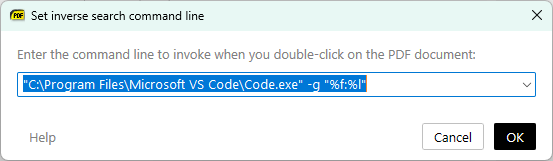
Show images stored in separate files (AllowExternalImages)
AllowExternalImages)New
AllowExternalImages advanced setting (off by default for security): when enabled, PDFs can display images stored in separate files next to the PDF (“external image streams”), matching Acrobat (#3731).Citation preview for plain-text references
The citation hover preview now also works for plain-text references like
[12] that aren’t real links, showing the matching bibliography entry. Links inside the preview popup are clickable, the popup stays open while you move onto it. With the mouse on the link, the wheel scrolls the document, Shift + wheel scrolls the popup and Ctrl + wheel zooms it; with the mouse on the popup, the wheel scrolls it. The preview is off by default since 2026-06-22; enable it by setting CitationHoverDelay to a positive value.More: changes from June 23, 2026 and the full changelog.